

Fix Elementor’s Broken FAQ Schema: Write Proper JSON for AI Search
Why Your Elementor FAQ Widget Isn’t Enough
You’ve added the Elementor FAQ widget to your page. It looks lovely. The accordion expands and collapses beautifully. Job done, right?
Not quite.
Here’s what Elementor’s FAQ widget actually delivers: a visually appealing accordion that creates basic FAQ schema. And when I say basic, I mean it creates the bare minimum structure that Google will accept without complaining… when it works at all.
The Known Elementor FAQ Schema Bug
This isn’t just a theoretical problem – I discovered it the hard way.
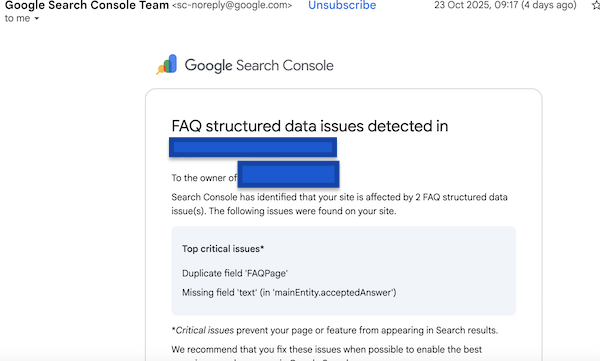
I toggled on FAQ schema in Elementor for a test site to see what would happen. Then Google Search Console sent me a delightful email flagging errors: “Missing field ‘text’ (in ‘mainEntity.acceptedAnswer’)” and “Duplicate field ‘FAQPage'”.
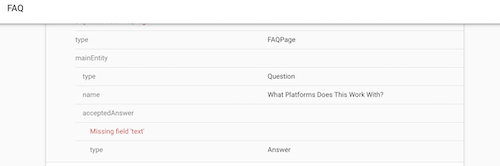
The acceptedAnswer error is officially acknowledged by Elementor’s support team and tracked on GitHub, with developers stating they’re “working on implementing a fix in one of the future updates” – but there’s no ETA and this has been ongoing since January 2025. The problem stems from Elementor’s caching mechanism interfering with how the schema script renders. To Google’s crawler (and AI crawlers), the part of the code containing the actual answer text appears empty.
The duplicate FAQ error happens because Elementor’s FAQ schema toggle works at the individual accordion widget level – meaning if you have multiple accordion widgets on a page and enable schema on each one, you’re generating multiple FAQ schema blocks on a single page. Google’s guidelines explicitly state you should only have one FAQ schema markup per page, so multiple schema blocks trigger the duplicate error.
That’s when I realised there was a fundamental problem with Elementor’s FAQ implementation and why I need to show you what’s actually happening becuase you may have inadvertently toggled this feature on thinking you were doing the right thing in terms of AI visibility.
The bigger problem? AI engines like ChatGPT, Claude and Perplexity need proper structured data to understand and cite your FAQ content. Elementor’s implementation – even when it’s not actively broken often falls short of what these engines actually need to confidently recommend your business.
This is particularly frustrating for coaches and course creators whose FAQ sections contain critical information about their offerings, pricing, and what their clients are actually going to get from the transformation.
Now that we’re in an AI Search time, you’re not just trying to rank in Google search results anymore – you’re need to get cited in AI responses.
Which means you need to understand how to craft proper FAQ schema JSON yourself.
What FAQ Schema Actually Does (And Why AI Engines Love It)
FAQ schema is structured data that explicitly tells search engines and AI platforms: “This is a question. This is its answer. They go together.”
Without this explicit structure, AI engines have to guess what’s a question and what’s an answer based on your HTML markup. Sometimes they guess right. Often they don’t bother.
Proper FAQ schema removes all guesswork by providing:
- Clear question identification: This exact text is the question
- Associated answer content: This specific content answers that question
- Explicit relationships: These Q&A pairs belong together as a set
- Context signals: This FAQ relates to this specific page/offering
The AI Advantage
When AI engines encounter proper FAQ schema, they can confidently extract and cite your answers in their responses. Without it, your expertise remains invisible even if your content is brilliant.
The Complete FAQ Schema JSON Structure
Let’s build this from scratch so you understand every piece. FAQ schema uses JSON-LD (JavaScript Object Notation for Linked Data) format, which is just a fancy way of saying “structured information that machines can read.”
The Basic Template
Here’s the fundamental structure you’ll be working with:
html
<script type="application/ld+json">
{
  "@context": "https://schema.org",
  "@type": "FAQPage",
  "mainEntity": [
    {
      "@type": "Question",
      "name": "Your question text here",
      "acceptedAnswer": {
        "@type": "Answer",
        "text": "Your answer text here"
      }
    }
  ]
}
</script>
Breaking Down Each Component
The Script Wrapper:
html
<script type="application/ld+json">This tells browsers “Hey, this is JSON-LD structured data, not JavaScript to execute.” Always include this exactly as shown.
The Context Declaration:
json
"@context": "https://schema.org"This establishes that we’re using Schema.org’s vocabulary. Required for all schema markup.
The Type Declaration:
json
"@type": "FAQPage"This declares “this entire block of data represents an FAQ page.” This is what makes search engines and AI engines recognise your content as FAQ material.
The Main Entity Array:
json
"mainEntity": [ ... ]This is where all your individual Q&A pairs live. The square brackets indicate this is an array (list) that can contain multiple questions.
Crafting Individual Question-Answer Pairs
Each question in your FAQ needs its own object within the mainEntity array. Here’s the structure for a single Q&A pair:
json
{
  "@type": "Question",
  "name": "What results can I expect from your coaching?",
  "acceptedAnswer": {
    "@type": "Answer",
    "text": "Most clients see measurable improvements within 90 days when they implement the strategies we cover in our sessions. Typical outcomes include increased revenue, better work-life balance, and clearer business direction."
  }
}
Key Rules for Question-Answer Pairs
- Question text goes in the “name” field: This should be the exact question your potential clients are asking. Make it natural and conversational.
- Answer text goes in the nested “text” field: This is where you provide the actual answer. Can be as long as needed, but keep it focused and valuable.
- Escape special characters: If your answer contains quotation marks, escape them with a backslash:
\" - Separate multiple pairs with commas: Each Q&A object needs a comma after it, except the last one.
Common JSON Syntax Errors
- Missing commas between Q&A pairs (causes validation failure)
- Extra comma after the last Q&A pair (breaks the JSON)
- Unescaped quotation marks in your text (terminates the string prematurely)
- Missing closing brackets or braces (invalidates the entire schema)
A Real-World Example: Coach’s Service Page FAQ
Let’s show you a complete FAQ schema for a business coach’s service page. This example includes multiple Q&A pairs covering pricing, process, and results:
html
<script type="application/ld+json">
{
  "@context": "https://schema.org",
  "@type": "FAQPage",
  "mainEntity": [
    {
      "@type": "Question",
      "name": "How much does your coaching programme cost?",
      "acceptedAnswer": {
        "@type": "Answer",
        "text": "My 90-day intensive coaching programme is $4,500, which includes twelve 1:1 sessions, unlimited email support, and access to my resource library. Payment plans are available for established businesses."
      }
    },
    {
      "@type": "Question",
      "name": "What's included in your coaching sessions?",
      "acceptedAnswer": {
        "@type": "Answer",
        "text": "Each 60-minute session includes strategic business planning, accountability check-ins, problem-solving for current challenges, and actionable next steps. Between sessions, you'll have email access for quick questions and course corrections."
      }
    },
    {
      "@type": "Question",
      "name": "Who is this coaching programme best suited for?",
      "acceptedAnswer": {
        "@type": "Answer",
        "text": "This programme works best for established female entrepreneurs already generating £50K+ annually who feel stuck at their current revenue level. You're ready to scale strategically but need expert guidance to identify and remove the bottlenecks holding you back."
      }
    },
    {
      "@type": "Question",
      "name": "How quickly will I see results?",
      "acceptedAnswer": {
        "@type": "Answer",
        "text": "Most clients report clarity and momentum shifts within the first month. Measurable business results—increased revenue, better systems, improved work-life balance—typically appear within 60-90 days when you implement the strategies consistently."
      }
    }
  ]
}
</script>
Notice the Details
Each Q&A pair includes specific, valuable information that AI engines can extract and cite. This isn’t vague marketing nonsense, it’s concrete information about pricing, process, ideal clients, and expected outcomes.
How to Handle Complex Answers with HTML Formatting
Sometimes your answers need lists, emphasis, or multiple paragraphs. You can include basic HTML within the answer text, but you need to escape it properly.
Example with HTML in the Answer
json
{
  "@type": "Question",
  "name": "What's included in the course?",
  "acceptedAnswer": {
    "@type": "Answer",
    "text": "<p>The complete course includes:</p><ul><li>8 video modules covering strategy fundamentals</li><li>Downloadable workbooks and templates</li><li>Private community access</li><li>Monthly live Q&A sessions</li></ul><p>You'll have lifetime access to all materials and future updates.</p>"
  }
}
HTML Formatting Rules
- Allowed HTML tags:
<p>,<br>,<ul>,<ol>,<li>,<strong>,<em> - Not allowed:
<a>(links),<img>(images),<script>, or any interactive elements - Always escape ampersands: use
&instead of& - Keep formatting simple – AI engines strip most HTML anyway
Where to Place Your FAQ Schema
Once you’ve crafted your JSON-LD, you need to add it to your page. You have three options:
- In the page
<head>section: The most common and reliable location. Works for all pages and doesn’t interfere with page content. - In the page
<body>section: Also valid, particularly if you’re adding it via a page builder. Can go anywhere in the body, though conventionally it’s added near the FAQ content itself. - Via a global injection point: If your site has a header injection option (like WordPress’s site-wide header), you can add it there. However, this only makes sense if the FAQ applies site-wide, not page-specific.
For Elementor Users
The cleanest way to add custom schema alongside Elementor’s generated schema is using the HTML widget. Drop it at the bottom of your page, paste your JSON-LD code, and you’re done. This keeps your schema with the relevant page rather than buried in theme files.
Testing Your FAQ Schema
Never publish FAQ schema without testing it first. Here’s how to verify your code is valid:
Use Google’s Rich Results Test
- Go to Google’s Rich Results Test tool:
search.google.com/test/rich-results - Paste your complete schema code (including the
<script>tags) - Click “Test Code”
- Check for errors or warnings in the results
What You’re Looking For
Ideal result: “FAQ eligible” with no errors
Acceptable: Valid schema with minor warnings (these usually don’t prevent functionality)
Not acceptable: Critical errors that prevent parsing
Common Validation Errors and Fixes
Error: “Unexpected token”
Fix: Usually a missing comma, extra comma, or unescaped quotation mark. Check your punctuation carefully.
Error: “Missing required field”
Fix: Every Question must have a “name” and every Answer must have “text”. Check you haven’t missed either.
Warning: “Invalid HTML in text”
Fix: Remove unsupported HTML tags or escape them properly.
Warning: “URL expected”
Fix: Any URLs in your schema must be complete (including https://). Relative URLs won’t validate.
Important Note About JavaScript-Based Schema Delivery
If you’re using a tool like StructuredAF that delivers schema via JavaScript and CDN (rather than embedding it directly in your HTML), Google’s Rich Results Test won’t be able to see it – because the test tool doesn’t execute JavaScript the way real crawlers do – and of course it’s built for “2015 era SEO”.
This doesn’t mean it’s not working.
The actual Google crawler, ChatGPT’s crawler, Perplexity’s crawler, Claude’s crawler and other AI engines do execute JavaScript. They’ll see and index your schema perfectly fine. The Rich Results Test is designed to validate static HTML schema, not JavaScript-delivered schema.
To verify JavaScript-delivered schema is working:
- View the page source in your browser and check the Network tab to see if the schema script loads
- Use browser developer tools to inspect the DOM and verify the schema is present
- Monitor Google Search Console for any actual crawling or indexing errors (not just Rich Results Test errors)
- Check AI crawler logs to verify they’re accessing your schema
The key advantage of JavaScript delivery is “diplomatic immunity” – hosting providers can’t block schema they don’t know exists until it’s already loaded by legitimate crawlers.
Beyond Basic FAQ Schema: Advanced Techniques
Adding Multiple FAQ Schemas to One Page
If you have FAQs in different sections (say, general FAQs and pricing FAQs), you can add multiple FAQ schema blocks. Each needs its own complete <script type="application/ld+json"> wrapper.
Important: Don’t nest FAQPage schemas inside each other. Each should be a separate, complete schema block.
Connecting FAQ Schema to Specific Offerings
Want to make it crystal clear that your FAQ relates to a specific course or service? Add an “about” reference:
json
{
  "@context": "https://schema.org",
  "@type": "FAQPage",
  "about": {
    "@type": "Course",
    "name": "Your Course Name",
    "url": "https://yoursite.com/course"
  },
  "mainEntity": [ ... ]
}
This explicitly tells AI engines “these FAQs are about this specific offering.”
Maintaining Your FAQ Schema Over Time
FAQ schema isn’t a “set and forget” element. Your business evolves, your offerings change, and your clients ask new questions.
When to Update Your FAQ Schema
- Pricing changes: Update immediately to avoid misleading potential clients
- New frequently asked questions emerge: Add them monthly or quarterly
- Process or offering changes: Update within a week to maintain accuracy
- You spot incorrect information: Fix it the same day – misinformation hurts credibility
Keep a Source Document
Maintain a simple text file or doc with your FAQ schema. When you need to update it, edit the source document, validate the changes, then update your live site. This prevents you from accidentally breaking working code.
Tired of Manually Managing Schema for Every Page?
While this guide gives you full control over FAQ schema, maintaining it across multiple pages gets tedious fast. StructuredAF generates all your schema automatically – FAQ, Course, Service, Person, Organization – and delivers it via JavaScript and CDN so it works everywhere, even on platforms that block AI crawlers from even reading your traditional HTML schema.
One line of code • Works on any platform • Handles all schema types
The Bottom Line on FAQ Schema
Proper FAQ schema isn’t optional anymore if you want AI engines to cite your expertise. Elementor’s FAQ widget creates visual appeal but often falls short on the structured data side – and when it breaks, you’re left with errors in Search Console and missed AI visibility opportunities.
By understanding how to craft FAQ schema JSON yourself, you gain:
- Complete control over what information AI engines see
- Independence from plugin limitations that hold back your visibility
- The ability to add schema to any platform – not just WordPress
- Confidence that your expertise is properly structured for AI discovery
Yes, it requires learning some technical structure. But it’s not complicated once you understand the pattern. And the visibility benefits? Worth every minute spent getting it right.
Remember: AI engines reward explicit structure over clever inference. Give them clear, properly formatted FAQ schema, and they’ll give you citations in their responses.